by Hayden Scott | Aug 21, 2015 | Other
Santos’ GoPro Clarity
Wildcard Bruno Santos makes the drop look easy for his fifth GoPro Challenge submission. Wildcard Bruno Santos (BRA) took out Jeep Leader Adriano de Souza (BRA) in Round 3 in his quest for the Billabong Pro Tahiti win. The Brazilian is keeping his head in tune hunting a GoPro Challenge win with yet another entry from Teahupo’o.
MORE FROM TAHITI Recap: Round 1, Heats 1-8; Round 1, Heats 9-12 & Round 2; Round 3, Heats 1-8 Watch: Condensed Heats, Excellent Rides Heat Analyzer Full Results GoPro Challenge: Tahiti The Vans Pro Junior resumed on the East Coast at Virginia Beach, but it was the Californian’s who stood out on Day 4. The Aussie charger reflects on his recent competitive mojo and the approach he takes when competing on one of the world’s most dangerous Another lay day in Tahiti as WSL commentators talk Title race, heats to come and the Surfline Forecast. Ronnie Blakey, Peter Mel and Ross Williams discuss the rough starts of Kelly Slater and Gabriel Medina in 2015. Nicollo Porcella appears in another angle as he stumbles down the face and goes over the falls at Teahupoo. Video by Raipona Pua….
See all stories on this topic
Fotokite Phi: Selfie Drone With GoPro
Yen Palec | Aug 20, 2015 03:11 AM EDT Fotokite Phi is a new quadcopter that does not require too much technical know-how to be operated. It has a GoPro camera and retractable leash that makes it very easy to be operated unlike most drones and quadcopters currently out on the market.
Designed by Perspective Robotics AG and funded through crowdfunding website Indiegogo, Fotokite Phi follows in the same breath as its professional version commonly used by well-known media outlets such as the British Broadcasting Corporation. One glaring difference the Fotokite Phi offers is its retractable leash and instead of integrating a built-in camera the quadcopters uses either a GoPro Hero3 or a GoPro Hero4 camera. The Fotokite Phi is designed to be very portable. The quadcopters can be folded and can fit inside a tube roughly the size of a whiskey bottle, according to CNet . It also weighs less with just a little over 350 grams.
The quadcopters has a camera housing that can hold the GoPro camera. Users can setup the camera housing to look down for overhead shots. There is also a button located at its back which turns both the quadcopters and GoPro camera on. The retractable leash of the Fotokite Phi which can be extended up to 26 feet has its own processor and sensors that allow its users to fully control the quadcopters by pressing and holding a button or moving the leash towards the direction the user wants to go. According to Tech Crunch , the Fotokite Phi will be released within the first few months of 2016. It can be pre-ordered in Indiegogo for $349….
See all stories on this topic
Slick Stabilizer for GoPro Raises over $100000 in 24 hours
The GoPro cameras have image stabilization, but it is not perfect. The Slick stabilizer has a motor on each of the three axes driven by micro controllers. The motors keep the GoPro leveled regardless of the kind of terrain you’re moving on. The difference becomes incredible obvious when watching footage of a GoPro and a GoPro with Slick side-by-side.
The Slick Stabilizer is also water-proof and can be directly attached on the standard GoPro mount. The added weight is 0.66lbs and the removable battery supports 2 hours of stabilization. The Slick Stabilizer is available as Late early Bird perk on IndiGoGo for $209. The final retail price will be $229 when shipping in March of 2016. The team behind Slick worked 2 years on the stabilizer. They took the inspiration from 3D gimbals mounted on drones. Please enable JavaScript to view the comments powered by Disqus. blog comments powered by Disqus Back to Top | Read the Latest Stories Luigi Lugmayr Luigi Lugmayr (Google+) is the founding chief Editor of I4U News and brings over 15 years experience in the technology field to the ever evolving and exciting world of gadgets. He started I4U News back in 2000 and evolved it into vibrant technology magazine. Luigi can be contacted directly at ml@i4u.com. …
See all stories on this topic
by Hayden Scott | Nov 21, 2014 | Tech
Confused About Which HERO4 To Buy?
Just to continue that shake up feeling we’re not going to discuss the models in the usual descending order, and we’re not going to go into the specifications in intricate detail. The point of this article is to help you make the decision on which model to buy. To do this we’ve gone through reviews from the Top Internet Reviewers, and looked at buyers reviews and reactions since the product went on sale.
For the people thinking:
“Ah! I’m even more confused. Now we have two HERO4 models, a HERO3+ model, a HERO3 model, and a HERO which should be a GoPro HERO4…but it’s not.”
Relax! it has complicated things a little, but the HERO3+ Silver and the HERO3 White are between the HERO4 SILVER and the new HERO entry level. This means that the cameras haven’t been directly superseded by the new HERO4 (as is usually the case) and we’ll discuss that in separate article.
GoPro themselves have always been able to play the high specification card, but with the capacity of the cameras currently moving faster than the market for viewing such high resolution material it would make sense to focus on the best (read: most realistic) specification for the mainstream user. For now that seems to be the GoPro 4 SILVER.
[easyazon_link asin=”B00NIYJF6U” locale=”US” new_window=”default” nofollow=”default” tag=”goprotimescom-20″ add_to_cart=”default” cloaking=”yes” localization=”default” popups=”default”]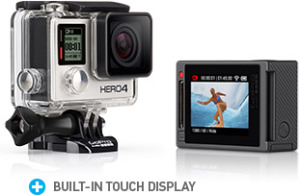 [/easyazon_link]
What Does The HERO4 SILVER Have To Offer Me?
With everything the old GoPro HERO3+ Black edition had, plus the addition of a new integrated touchscreen, the HERO4 SILVER has possibly become the new market leader, at least for users looking for a top class specification and maximum user-friendliness. The introduction of the screen has given it two major advantages:
- It addresses one of the main limitations with action cameras, which is not being able to easily check your field of vision until after the event.
- It allows better handling of the menu navigation, which was always a little frustrating even before the introduction of an ever-increasing list of camera settings.
The screen alone sets it apart, and when you consider the 20% lower price tag for the[easyazon_link asin=”B00NIYJF6U” locale=”US” new_window=”default” nofollow=”default” tag=”goprotimescom-20″ add_to_cart=”yes” cloaking=”default” localization=”default” popups=”default”] GoPro HERO4 SILVER[/easyazon_link] compared to the current price for the[easyazon_link asin=”B00NIYNUF2″ locale=”US” new_window=”default” nofollow=”default” tag=”goprotimescom-20″ add_to_cart=”yes” cloaking=”default” localization=”default” popups=”default”] GoPro HERO4 BLACK[/easyazon_link] it makes it even more tempting.
But what of you’re on the fence between the GoPro HERO4 SILVER and the GoPro HERO4 BLACK…
[easyazon_link asin=”B00NIYNUF2″ locale=”US” new_window=”default” nofollow=”default” tag=”goprotimescom-20″ add_to_cart=”default” cloaking=”default” localization=”default” popups=”default”]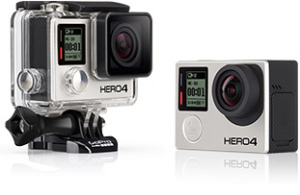 [/easyazon_link]
Why Should I Consider Paying More For The HERO4 BLACK?
The one thing that may sway your decision on whether to plump for the BLACK is the 120 FPS (Frames Per Second) available at 1080p. For lovers of slow motion this can be seen as a real bonus, and it’s likely to be used more often than the higher resolutions of 2.7K and 4K.
For people who decide to stay with the SILVER, 60 FPS at 1080 p is still a very respectable option, and based on your own post-production ability it can still produce excellent results.
[easyazon_link asin=”B00NIYNUXO” locale=”US” new_window=”default” nofollow=”default” tag=”goprotimescom-20″ add_to_cart=”default” cloaking=”default” localization=”default” popups=”default”]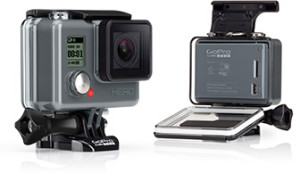 [/easyazon_link]
Is A Touchscreen Good Enough Reason For Me To Buy The GoPro HERO4 SILVER Over The GoPro HERO?
Realistically the two cameras aren’t comparable. The new GoPro HERO offers an entry-level alternative [easyazon_link asin=”B00NIYNUXO” locale=”US” new_window=”default” nofollow=”default” tag=”goprotimescom-20″ add_to_cart=”yes” cloaking=”yes” localization=”default” popups=”default”] at a great price [/easyazon_link] for people wanting to get into the sports camera market on a low budget.
If you were to consider a different GoPro to the HERO4 SILVER you should be looking at the 3+, not the new HERO.
OK I’ve Decided I Want A GoPro HERO4. Which One Do I Buy?
To recap, we’re not drawing parallels with other sports cameras. This is just for people who have already decided on GoPro. Check out one of our other articles if you still need to make the decision “Which action camera?” and not “Which GoPro?”.
Start by asking yourself the following questions.
STEP 1
- Do I have 4K monitor to fully enjoy the finished video?
- Do I have a computer with the processing power and hard drive capacity to handle 4K postproduction?
- Do I have editing software that can handle 4K?
If the answer is “yes” to all of the STEP 1 questions, and you can put the time into getting the best out of 4K footage, then you can certainly consider a GoPro 4 Black.
If the answer is “no” to any of those questions, then consider whether you want to make that investment or it’s better to leave the [easyazon_link asin=”B00NIYNUF2″ locale=”US” new_window=”default” nofollow=”default” tag=”goprotimescom-20″ add_to_cart=”yes” cloaking=”yes” localization=”default” popups=”default”]GoPro HERO4 BLACK [/easyazon_link]alone.
STEP 2
- Am I still into video but don’t have all the hardware and software required to really get the most out of 4K?
- Am I into my sport/activity and love re-living the best moments?
- Have I got a bit of extra cash and would really like to experiment with all the different options that a more advanced camera offers?
If the answer is “yes” to STEP 2 questions, then the [easyazon_link asin=”B00NIYJF6U” locale=”US” new_window=”default” nofollow=”default” tag=”goprotimescom-20″ add_to_cart=”yes” cloaking=”yes” localization=”default” popups=”default”]GoPro HERO4 SILVER [/easyazon_link] is properly worth the extra money for you.
NOTE: If you fall somewhere in between STEP2 and the next STEP 3 then you may want to look for the [easyazon_link asin=”B00F3F0EIU” locale=”US” new_window=”default” nofollow=”default” tag=”goprotimescom-20″ add_to_cart=”default” cloaking=”yes” localization=”default” popups=”default”]GoPro HERO3+ Silver Edition [/easyazon_link] or the [easyazon_link asin=”B00GXKTEUI” locale=”US” new_window=”default” nofollow=”default” tag=”goprotimescom-20″ add_to_cart=”default” cloaking=”yes” localization=”default” popups=”default”] GoPro HERO3 White Edition [/easyazon_link] which are selling for really at competitive prices on Amazon right now.
STEP 3
- Do I want a camera that I can throw around and dropping the swimming pool with friends and family without worrying about getting damaged?
- It’s just a fun on a small budget?
The new HERO is one for you.
If you were wondering when all the cameras were introduced you can find information on each GoPro update in this article
For more information check out the articles below from some of the Top Internet Reviewers.
 The 2014 GoPro’s In-Depth Review – DC Rainmaker
http://www.dcrainmaker.com/ Wed, 12 Nov 2014 21:45:00 -0800
The camera itself (duh) – The battery for the camera – A mini-USB cable – An underwater case rated to 40m/131ft – An alternate/secondary door for the case that allows for better audio – A small stack of GoPro stickers – A small quick-start guide and other paper junk – A flat adhesive mount – A curved adhesive ….. But, when it comes to playback, it might be played back at 30FPS, which then results in that one-second moment of action taking 4 seconds to play back.
Read more …
 Review: GoPro Hero 4 Black brings high frame rates to high …
http://appleinsider.com/ Mon, 27 Oct 2014 10:09:18 -0700
Finally, the Hero 4 Black, GoPro’s flagship and the camera under review, carries over the same small form factor for which the company is known, but doubles high-resolution frame rates to 120fps for 1080p and 30fps for 4K.
Read more …
 When it comes to GoPro’s new Hero4 camera, silver is the …
http://www.engadget.com/ Wed, 19 Nov 2014 07:00:00 -0800
Recently though, GoPro changed things up a bit, releasing a new “Hero” entry-level camera (note, no “4”) while introducing the Hero4 in Silver and Black editions ($400 and $500, respectively). Another first was that the Black wasn’t just the Silver with a few more features or camera modes. The Silver …. Get better reviews from people who actually have this product! write a reviewsee all reviews →. No one has started a discussion about this product yet. Why not be the …
Read more …
GoPro Hero4 Silver review | Digital Trends
http://www.ecoustics.com/ Sat, 01 Nov 2014 22:00:14 -0700
If you choose 1080, you get the option of something called SuperView. This feature lets you capture a bit more of the sky and ground by taking a 4:3 aspect ratio shot and, as GoPro puts it, “dynamically stretching” it to a 16:9 …
Read more …
by Hayden Scott | Nov 21, 2014 | Drift, Other
GoPro HERO4 SILVER In It’s Cross-hairs
This classic design remains a favorite for people riding motocross, mountain bike and many other helmet wearers. The shape harps back to the original concept of helmet-cams, as they were considered before the onslaught of GoPro et Al. The whole feel of the Drift GHOST-S is rugged, and that should certainly appeal to the rugged kind of users that it is aimed at. The Drift doesn’t have the exterior case required by many sports action cameras to protect them from the elements, and waterproofing is good to a depth of 3 meters. If you’re just reading specifications 3 meters might not sound like much, but we’re guessing that if you asked every person you know the last time they swam to this depth or beyond, no-one would be surprised by the answers. So apart from diving clubs, this is no deal-breaker. Unless you’re unfortunate enough to drop it over the drink it’s a non-issue, and in reality you’re more likely to drop it over something hard, so the 2 meter shock resistance is much more important.
Drift GHOST-S Port Access
Keeping on the subject of protection, everything you need to get to is safely protected behind the rear cap. The SD card slot, HDMI output, USB port, and the battery access are all situated here; there’s also an input for an external microphone, but that’s maybe more of a ‘nice to have’ than something of real use. The cap is secured by a screw with a large rotating head which works well until either cold fingers or glove hands become an obstacle. But Drift have thought of this, and a mount included with the package doubles to serve as a tool for loosening/tightening the large finger screw.
One advantage of this platform is the ability to rotate the lens through 300 degrees. This means less easier image alignment, made even easier with the LCD screen, and the camera placed on a good stable base as often as possible.
[easyazon_image add_to_cart=”default” align=”right” asin=”B00GJRCPRO” cloaking=”default” height=”282″ localization=”default” locale=”US” nofollow=”default” new_window=”default” src=”http://ecx.images-amazon.com/images/I/31jVutf25dL.jpg” tag=”goprotimescom-20″ width=”500″]
The Other Advantages
Among the other plus’ are:
- Video specification matching that of the new GoPro HERO4 SILVER at 1080p/60FPS
- Matching 12-megapixel still photo sensor
- Gorilla Glass equipped screen
- Battery that puts others to shame
- WiFi
- Color coded LED indicating the current mode (it you have a head for remembering what all the color mean)
- Easy-to-use remote (App available for Android and iOS)
[easyazon_cta add_to_cart=”default” align=”center” asin=”B00GJRCPRO” cloaking=”default” height=”28″ key=”wide-orange” localization=”default” locale=”US” nofollow=”default” new_window=”default” tag=”goprotimescom-20″ width=”176″]
It’s obvious from the list that, whilst the worlds eyes were on the competition, the team at Drift Innovation have been beavering away. 2015 is going to be tough with all the “Me-Too” major manufacturers jumping on the bandwagon, so it’s good to see a real hard-core/grass-roots player still keeping it real.
Here’s a selection of the best reviews we’ve found around the web.
 Drift Ghost S hands-on – Engadget
http://www.engadget.com/ Tue, 26 Nov 2013 10:26:00 -0800
Drift Innovation has been making action cameras for some time now. Today sees its latest offering — the Ghost S — hit stores globally. What’s new this time? Well there’s the usual assortment of video improvements: 1080p at …
Read more …
 Drift Industries Announces New, Faster Ghost-S … – Review
http://reviews.mtbr.com/ Wed, 20 Nov 2013 03:09:58 -0800
Meet the new Ghost-S, the latest POV HD video camera from Drift Innovations. The Ghost-S builds on the previous HD Ghost platform with a better lens, a new Sony CMOS sensor, more speed and improved battery life …
Read more …
 Drift Ghost S Helmet Camera … – CycleTechReview
http://cycletechreview.com/ Sat, 14 Jun 2014 06:38:40 -0700
However, just like bikes, not all cameras are created equal and the Drift Ghost S makes claim to be the best helmet camera (or action camera, as they are also known) for cyclists. Go Pro may be the best known brand in the …
Read more …
 Tested: Drift Ghost-S Action Camera – Flow Mountain Bike
http://flowmountainbike.com/ Tue, 28 Jan 2014 19:15:28 -0800
However, the Drift Ghost-S is a fresh camera with a different approach on life and we think it’s definitely worth consideration. It’s water-proof, without the need of extra casing; has an in-built LCD, so you can review your shots …
Read more …
by Hayden Scott | Nov 4, 2014 | Other, Tech
GoPro Battery Charging
If possible, charging the batteries off the camera rather than by USB is preferable. Completely flattening the GoPro battery before recharge is good practice and will not only improve battery performance when using the camera, it will also increase the overall length of the batteries life. If not using an official charger be sure to check the voltage and current ratings of aftermarket chargers, as the charging rates will affect battery life.
Battery Life
With so much going on in such a small box, the battery life of the Hero 3 is probably one of its weakest points. All the high resolutions and frame rates require a high amount of processing power, whilst the reduction in size compared to the Hero 2 means that the battery capacity has actually decreased. Increases in technology are undoubtedly enhancing the possibilities of reducing overall camera size; however coupling battery technology with the pace of camera technology has always been difficult for manufacturers. On top of the optical technology, there is also now the Wi-Fi built-in as opposed to the original Wi-Fi backpack, which had its own battery source.
Maximizing battery life is always easier if you have a better understanding of the equipment and the different functional modes of your GoPro. Because of this standby mode is probably the best one to understand.
GoPro Battery life in standby mode can be up to 6 hours. The standby mode starts after the camera has been idle for 5 minutes in any state other than recording. Once in standby there is no apparent difference on the screen, however a delay of about 1 second is noticeable if you press the record button. Bear this in mind if you’re standing waiting to film or a photo of somebody passing as you may miss the moment you’ve been waiting for… by about 1 second. People having used the HD Hero 2 will know that there is a time setting for the standby mode, but this is not yet the case for the Hero 3. So despite the comfort of knowing that if you forget the camera will always turn itself off, during a day those 5 minutes each time can easily add up to half an hour or more of use so be aware.
GoPro Battery Life With Wi-Fi
Wi-Fi ON and the APP: Reduction in battery life of up to 20%.
Wi-Fi ON and the Remote: Reduction in battery life of up to 10%.
With the Wi-Fi switched on for use with the APP the camera generates its own wireless hotspot, so it has to do this on top of all the normal camera operation. Twenty % is a fair amount so it is worth considering how long you are going to be using it for and whether it is easier to push the button on the camera rather than the button on your phone. This could really be more dependent on where the camera is positioned.
The time limit seems to stand-up better using the remote, but really without fully understanding the different protocols GoPro use we do not have a technical reason but it is certainly a good thing to know if using the phone APP is one of your habits. A suggestion would be to use the phone APP to ensure that the camera is framed correctly and then take over with the remote, or just click off the Wi-Fi if you need to get a full day’s use out of the camera. For those who do not know, holding down the Wi-Fi button until the blue light has blinked seven times, confirms that the Wi-Fi is off.
Using a higher frame rate (fps) has quite a large effect on battery life, as do the higher resolutions due to amount of processing required to transfer everything to the SD card. The intensity of the processing can also be noticed by the length of time the camera takes to become ready for action again after recording has been stopped. This is down to the transfer time.
If you want to know more about Lithium batteries used in portable devices, try this article.
by Hayden Scott | Nov 10, 2013 | Tech
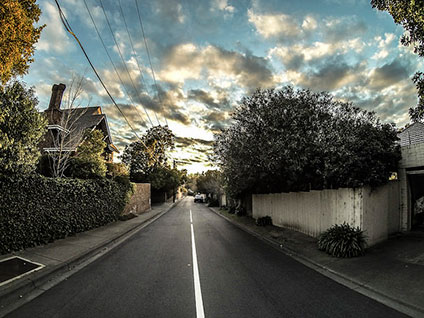
Choosing the correct GoPro settings is what makes the difference between success and failure.
Part 1 of this article will help you choose “GoTo” settings that you can rely on whenever you pull out your GoPro, and explain why they are suitable. It’s always better to start from something that you know and understand before exploring all the many features and settings that your camera has to offer. Get the choice of these three nailed and then start playing with other options when you have some time to spare.
Part 2 briefly covers several other settings that are worth checking out.
If at the end of the article you decide that you would like to explore settings in more depth, you can either grab our Free pdf explaining Resolution, Field Of View and Frames Per Second, or you can get a copy of our recommended resource the Project GoPro eBook which covers a variety of GoPro skills in greater depth.
GoPro Settings Part 1: Find A “GoTo”
Probably the most versatile setting you can choose.
Pros:
- High quality image.
- Angle that’s wide enough give excellent peripheral vision, even close up.
- Frame rate that will give the option of producing reasonable slow-motion if the mood takes you during editing.
At 1080p this provides the best HD quality that the major of screen manufacturer systematically support at a reasonable price, and with the least hassle. Why the least hassle? 2.7K and 4K are without doubt major break-throughs, but they come at a price. At 1080p, and with 60 frames per second, you’re already going to start capturing a large amount of data. That data has to be transformed and stored very rapidly; at this setting everything should cope well both during filming, and as importantly during editing. The high setting will start to complicate things, especially if your editing equipment has limited resources.
If your GoPro has a habit of switching OFF when recording on this setting either make sure the Protune is switched OFF, change the frame rate to 30fps, or use the setting below.
Great for giving a more focused, enclosed feeling. Sometimes having a Wide angle can take the edge of your film; literally(*).
Use this setting if:
- Posting the video on social media. It’s ideal, and few people will notice a difference in quality.
- You know that Slow Motion will be imperative when editing. This will give you loads of scope without having to regenerate frames to fill gaps during post production. Remember to check that your software can import at this frame rate.
- You need the film to have a more focused, or faster feel, reducing the Field Of View can help (you can also try this at 1080p). Focal points such a Speedometer on a motorcycle will appear to take up real estate on the screen, and passing objects will appear to close in and pass more rapidly.
Reducing the Field Of View in the GoPro settings also reduces the amount of data being transformed, hence reducing the risk of the camera blocking and heating, without affecting picture quality.
(*)The Wide angle occasionally creates warping or ‘aliasing’ around the edges of the image. This isn’t the classic goldfish bowl optics of a ActionSports camera; this is a technical issue concerning data transfer, where the rate of information becomes too high and the camera process starts throwing away bits of information to keep up with pace.
This GoPro setting produces a nice clean “classic” feel with exceptional quality. You may feel the need to do some dynamic stretching during editing, or you may find you can reframe to suit proportions, but the quality should stand up to it. There’s no real need to do this, and the lack of aliasing with this setting makes for a very crisp video.
**************************************************
If you do decide that you really want a masterclass on GoPro Settings we recommend the ProjectGoPro eBook that will cover everything you need in detail.
**************************************************
GoPro Settings Part 2: Others Things You Should Check
SD card: before you start
- Always format the SD card in the camera before doing anything.
- The FORMAT option is found under the “delete” menu. This is logical for an Engineer, who would format the card after downloading and deleting the files from the camera. Many camera users have an inbred fear of delete buttons, or may have deleted directly from the computer, so the Delete menu may not be the natural choice searching for a formatting command.
- When moving files from the camera to a computer, take the SD card out and place it in a card reader rather than transfer by USB.
See Explaining SD Cards And Classes to avoid the pitfalls that some manufacturers lure you into…
For a FULL LIST of resolution setting and their attributes check out the GoPro Picture Quality.
-
What Do The GoPro Settings For PAL and NTSC Mean?
To set your camera this depends on your region. For the States it’s NTSC, and most Europeans have PAL. There are regions with SECAM and MESECAM, but if you are in doubt check.
The obvious differences that you will see are in the frame rates when setting your filming mode. NTSC works in multiples of 30, whilst PAL has multiples of 25. This is to take into account the difference in power standards between America (60 Hz) and Europe (50 Hz). To give a more visual example, anyone who has landed at night in a plane may have noticed that the lights below on the main roads appear to ripple of flicker; this is the effect of the electricity cycling over a distance. Choose the wrong settings in your editing software and you may get the same type of flicker.
-
GoPro Settings For Photos
Leave it on 12 MP wide. After transferring to your computer, you can crop, zoom, or re-frame during post-production. The GoPro effectively just scales the frame size down by cropping internally, so you may as well do this yourself and have the choice of re-positioning the frame as you want it. Unless you are looking to squeeze in more photos on your SD card then there is no real reason to change mode.
During the day: Put it on auto and it will give your footage a consistent look. If you think the colors look flat and the picture not very sharp when you look at the film, that’s good, that’s what it’s meant to do, don’t be alarmed. In reality, things are not extra sharp and colors are not over vibrant; most consumer cameras add this digitally. Professional ones spend their time gathering as much information as possible allowing the editor to make better color correction and sharpness during post-production.
At night: Switch it off. It creates ‘noise’ and that ruins the extra detail you’re getting.
-
Simultaneous video and photo
There are two ways of capturing photos whilst recording video; either pressing the power/mode button at any time during video recording, or setting the camera to take a photo every 5, 10, 30, or 60 seconds during video recording.
The photos will match the aspect ratio in whatever mode you are filming at the time. The results will not be the same quality as a 12 MP photo but they will be as good as high-resolution video screen grab, so depending on intended use afterwards (photo on the wall, or photo in a video) you may want to think about which mode to use; a specific photo mode will be better if you’re intending to hang it in the office.

Changing the GoPro settings to loop video footage.
What’s that I hear you say! I can change GoPro settings to use it like a security camera; if you plug the camera into a power source and leave it running you can set the time so that you always have the last ‘X’ number of minutes that you filmed. The only difference being that a security camera would do this for 24 or 48 hours and your GoPro will do this for 10, 20, 30 minutes, etc.
If you’d rather just watch some video to get you rolling, try this:
- [radium_embed_video title=”Choosing The Best GoPro Settings For Resolution, Frame Rate and Field Of View” link=”https://www.youtube.com/watch?v=HLH5LhGjRLc” size=”650 x 500″ fullwidth=”yes” lightbox=”no” thumbnail=””]
**************************************************
Need a masterclass on GoPro Settings? We recommend the ProjectGoPro eBook that will cover everything you need in detail.
**************************************************
Follow the link if you would like to find out more about different GoPro settings and models.
by Hayden Scott | Sep 13, 2013 | Tech
Video Editing Software: Formats And Editing Suites
Whatever you do with your GoPro you’ll need a few basic supporting items on top of the mounting systems. Your GoPro is generating a whole lot of data and you are going to need to understand how to handle it and how to process it. Here we discuss video editing software formats and editing suite options. If you need information on products that hold the data such as SD cards, computers, tablets and such like, check out some of our other posts. For now here is a few basics on the data itself and the things that you will need to deal with to get the ball rolling…
Data formats
Understanding video formats can be a nightmare for many people, but we’ll try to run through a few basic ideas to clear the way and hopefully ease compatibility issues depending on the intended final use.
GoPro stores its data in MP4 format in order to retain a suitably small file size. This means that an SD card can generally outlasts the battery autonomy whilst retaining excellent image quality. You really don’t need to know any more than that, but if you do…here it is. If you don’t, then read the video software reviews instead.
Formats and Software
What is MP4?
MP4 is an abbreviation of MPEG-4, sometimes referred to as MPEG-4 AVC, which stands for Advanced Video Coding. As the name suggests, this is a format for working with video files. The MPEG™ refers to Motion Pictures Expert Group who set the industry standards for digital audio and video. Several versions have been published since 1999 and the present version issued in 2003 seems to be standing the test of time and has now been widely adopted for video streaming in web applications. MP4 works by compressing the files without losing any of the quality, as MP3 technology does for music and audio files.
The MP4 is a container format, which allows a combination of audio, video, subtitles and still images to be held in a unique file. It also allows for advanced content such as 3D graphics, menus and user interactivity. When converting other formats to the MP4 format, any unnecessary information, unseen to the viewer, is stripped out, leaving the files a more manageable size. This gives higher bit rates and better streaming.
As a side note, don’t be confused by the format M4A which is just an audio version of MP4 and will play in most MP4 players; so don’t try to fix it if you see this format and have no video…there isn’t any.
What is AVI and why do we have to convert?
AVI is an acronym for Audio Video Interleave. This is a multimedia container format and was first released by software giant Microsoft in 1992. It is a general purpose container and was adopted early on by many software manufacturers, hence the regular need to make the conversion from MP4 to AVI as compatibility is high for editing suites.
The container file carries data ‘chunks’ in an uncompressed format whilst in the editing software. Before importing and after exporting the files are generally reduced in size using a CODEC (COmpressor-DECompressor), which is often where the end user may see the systems short-comings. Despite high compatibility, a lack of standardization has lead to a plethora of CODECs and if the player/computer you’re using doesn’t possess the one required the playback will be either nonexistent, missing either video or audio, or the video and audio will be out of sync.
That said, in most modern editing software this isn’t the issue it used to be 10 years ago. The output to DVD and the ever increasing popular MP4 for web purposes means that, for now, the need to scratch your head whilst choosing the output format is generally just a distant memory. However, the battle over the best web format isn’t finished, so we’re sure to revisit this subject in the future.
Does MP 4 have a CODEC?
Yes, there are a number of registered CODEC’s but most equipment/software manufacturers seem to have a preference for either:
MPEG-4 Part 10 (more commonly known as H.264 and probably familiar to most people)
MPEG-4 Part2
The Good News!
More and more editing suite manufacturers are building in direct compatibility with MP4 meaning no conversion on the importing side. This is great news and we’d like to hear from long-term users of products in this category.
Editing Suite Budget
Free Editing Suite: CineForm
The GoPro team supply some ‘free’ software in the shape of the CineForm Software Download. Most people have done little more on the GoPro website than watch the video of the week and check out the goodies. However, a browse through the support tab will enlighten you to software updates, as well as a user-friendly software interface for you to convert, edit, and apply a few post-production clean-ups.
Even if you intend to buy a more complete editing suite, the first thing to do is get this installed on your computer. Having tried several of the freebie converters out there, we can confirm that in order to keep the quality at the level of the original, look no further than this. You also require it as an interface to update your camera. They’ve done a great job, you undoubtedly pay for it in the price of the camera, so it’s a no-brainer; use it!
Consumer and Prosumer Editing Suites
OK, the CineForm does the basics, but you’re more the Steve Spielberg type and the craving to express yourself is becoming ever stronger. What are the options?
That’s down to budget and OS. Don’t over-estimate the power of your system because you’ll get frustrated as it blows a gasket trying to keep up with the heavy rendering processes involved in all those tempting features the editing suites offer. And certainly don’t over-estimate your own ability; you get what you’re paying for in expensive software, and you have to be savvy and know how to use it. Overspend and you’ll probably never use more than half of the products real power.
The most attractive films don’t use dozens of spiraling 3D transitions between clips. They have well-toned colors, direct exchanges between one shot and another, occasional basic fades. Titles can be more fun, and something with a creative titling package is money well spent as your imagination can run riot somewhat. Stabilizers are also a good option, and very often a necessity for ‘rescuing’ sports footage.
The expensive gear will allow you to get incredibly fine, balanced, deep colors and straighten warped edges and bent corners. If you’re posting for your mates on YouTube, no-one’s going to notice; don’t waste the money!
Check out some of the other posts in the Editing or Software Review Categories to see Video Editing Software Reviews.
by Hayden Scott | Sep 10, 2013 | Tech

Symptoms Related to GoPro Overheating
- GoPro hot to the touch, raising concern for it’s welfare.
- GoPro switching off and feels hot.
- GoPro temperature icon showing on screen.
Most Successful Actions.
[icon size=”tiny” icon=”icon-medkit” /]
- Check if there is an Over-Temperature indicator on the screen.
- Do some testing at home to see whether the problem is environmental or camera based.
- Check battery pack to see if the fit and connections are snug. Especially Aftermarket products.
- What settings are you running? If you’re using one of the higher resolutions, maybe the data transfer rate is making the work harder.
- Is the WiFi running, and if so are you using it/do you really need to use it?
- Try fitting the skeleton door if you don’t really need full protection.
- ************
If you do decide that you really want a masterclass on GoPro Settings we recommend the ProjectGoPro eBook that will cover everything you need in detail.
************
WHY:
Hero 3’s run pretty hot; we can’t yet comment for the 3+. Having squeezed the size down and put even more pressure on the battery (which is often the source of the heat), there are no real surprises. So what are your options if this is a concern for you?
Before doing a little analysis, be clear that this subject is discussed in the manual so it is a known issue under certain conditions and the camera has a mechanism to deal with it. So does it concern you because you don’t want your head to catch fire, or do you believe it to be the root of a bigger problem?
Just concerned because it feels damn hot? Normally there is a temperature indicator that will flash if the camera is beginning to over-heat. If you see this it’s probably time to switch it off for a while; and not just left on standby….completely off. On standby it’s still consuming, and if it’s consuming it’s heating.
Did the camera shut itself down, and it felt hot when you checked out what was happening? Maybe you should run a dry test and leave it running on the bar whilst you survey the LCD display. Find out if it’s just shutting off or you’re getting an overheat indicator before it switches off. If you didn’t see the indicator then you maybe you’re reading too much into the fact that it was hot and you should look elsewhere…try software level or card problems.
What conditions are you using it in? Out on the beach with a full waterproof housing, or in sub-zero on the north face of the Eiger? Clearly climate and enclosure are going to have an impact and, without stating the obvious, leaving it on the beach in full sunlight isn’t going to help. Try keeping it in the cool bag with your drinks when you’re not using it, and if you’re not surfing the pipe for 1h30 solid, give it a rest between runs.
If you’re in the snow, bury it for five minutes.
More seriously, aside from GoPro Lab’s possible issues, have you bought any aftermarket batteries or chargers. The standard battery already has a big job on, and we see that search results throw up cheaper batteries that have a higher mAH. It would be foolish of us to say any given battery is a good or bad choice without knowing fabrication details, but in the wider scheme, different maximum mAH and different charging currents can give similar batteries different output capacity curves. Some suppliers/manufacturers will manage this well and some will cream of the top off cheap imports. The results could be a little bit like “over-clocking” a home computer; your on-line gaming performs better, but the boost in performance results in riskier operating conditions.
As the battery is generally the cause of the heat (aided maybe by the processor) we would recommend charging either out of the camera or in the camera from a suitable wall usb charger rather than computer usb. And give it full cycles by letting it become fully discharged before giving it a full charge. Do not be tempted to give short boost charges just because it’s Li-ion. Those who had issues straight out of the box, finding that the battery life was poor until going through three or more full charge cycles will already understand this. Bear it in mind and maybe test it out yourself and noting any performance differences along the way.
We’ve not yet seen a heat-sink aluminium door on the market, and maybe this could be an option, but in the meantime just be kinder to your camera and set it up with a 120 second auto switch off setting…or you could ride faster to cool it down!
by Hayden Scott | Sep 10, 2013 | Tech
So What GoPro Camera Models Are Still Available?

If you’re puzzled by all the GoPro camera models on the market and can’t decide whether to go for the new GoPro 4 or get a bargain on previous models, here’s an older post covering some of those older models.
Hero 3+
Well its looks smaller! But that’s only the case. So why pay the extra money for the 3+, especially if I’m just upgrading?
There are a few features that could be interesting:
- As if the “old” Black Edition wasn’t sharp enough, this one is claiming another 30% improvement, so for those of you that don’t need glasses or for those who wear extremely large glasses you’ll probably see the difference. For everyone between with consumer editing software, you may not be aware of the difference in the finished video.
- Improved battery life. Yes, we heard lots of stories about battery life that could tempt the wallet out, but to be honest we’re pretty happy with the 1 hr 30 offer by a well maintained battery at the moment.
- Increased WiFi range. Not an issue for a lot of Bikers and Boarders as the rider generally has the controls. The biggest issue for us would more likely be interference with the multitude of other WiFi equipment around us. We practically swim in the waves from all directions. This kind of thing is extremely environmental and something difficult to quantify.
Bottom line for us is…we wouldn’t update from a 3 Black to a 3+ black, but would certainly consider it if we were sporting a Silver or White, and your Christmas list had a hole in it. Or maybe scoop up an Original Black Edition at a bargain price whilst stocks last.
Mr GoPro, if you’re listening, we still think the original Black is capable of so much more, hence the 3+ and not the GoPro Hero 4. Please let us have a software upgrade and leave the “oh look! We simply must buy a new one” stuff to iPhone users. We might buy the smaller case though, that’s cute 😉
The GoPro HERO 3: Black Edition…
…is the top of the range GoPro camera model (whether you go + or not, it’s still Black, Silver, White). It is Wi-Fi enabled, and has a 12-mega-pixel image sensor with 2 x better low-light performance than the previous range. It has a 6-element wide angle aspherical lens and can support up to 4K resolution video. It can also capture 2.7K, 1440p, 1080p, 960p, 720p and 480p video up to an impressive 240 fps (depending on resolution) for high-speed action and impressive slow motion playback. The Black Edition includes the Wi-Fi Remote in the price.
It has a micro HDMI output, a microphone/composite video port, and a microSD card slot that supports up to 64GB cards. Other features include video looping, Protune capabilities, manual white balance, and time-lapse recording. Impressively it also supports continuous photo shooting and burst photography at up to 30 fps. Picture in video is a feature which lets you simultaneously record video while shooting photos at 5, 10, 30 and 60 second intervals. A GoPro app is now available which facilitates live video preview and remote camera control via a smartphone or tablet.
Still can’t decide? Lets move to some other GoPro camera models.

The GoPro HERO 3: Silver Edition…
…which replaces the HD HERO 2, is a Wi-Fi enabled action camera with an 11-mega-pixel image sensor and a wide angle aspherical lens. Like its predecessor, the HD HERO 2, it also comes with a waterproof housing that can protect the camera to a depth rating of 197’ (60 m). It also captures up to Full HD 1920 x 1080p video at 30 fps, and supports several other recording resolutions and frame rates. Compatible with the LCD Touch BacPac, the Battery BacPac and the Wi-Fi Remote, it shares most of it’s brothers pedigree. The video looping, Protune capabilities, manual white balance, and time-lapse recording are also there, whilst the burst shooting is down to 10 fps.
The Silver Edition has most things that your TV resolution can cope with at the moment so it remains an excellent buy, and colors are well contrasted. Low light and rapid changes in light have always been the culprit of sudden drops in image quality and the HERO 3 range shows in remarkable step up in handling this issue. It’s worth noting that the lens of the Silver Edition still remains a step below the specification of the Black Edition. Check out the video here to see the differences between the HERO 3 Black Edition and the older HD HERO 2, especially with low light inside the tunnel. There is also a short version of this video, plus Parts 2 and 3 of the descent that can be found on our YouTube Channel or on the Team Videos page. The HERO 3 footage undoubtedly gives better detail, noticed particularly when looking directly at surfaces like snow, but the color can look a little drained. In reality this is a none issue as it can be dealt with in post-production, however we’ve purposely not treated any of the footage here with post-production filters or changes in back-light so that you can see the raw difference.
The GoPro HERO 3: White Edition…
…an updated original HD HERO, has nothing on its spec to be embarrassed about and with a significant cost difference to its Silver and Black brothers, it can still deliver 1080 HD quality results. Smaller, lighter than the original and now equipped with the new lens to reduce distortion you’re getting a good all round deal if your budget won’t stretch further. If you become a demi-god when it comes to killer angles and awesome editing, the audience may be too involved with the video to notice differences in quality, and certainly for some web-based applications the resolution is sufficient.
If you want eat dry bread for a few months so you can save up enough to enjoy the top spec GoPro HERO 3: Black Edition, then dry bread it is.Otherwise, buying one of the other GoPro camera models is still a great option!
by Hayden Scott | Aug 8, 2013 | Tech
First Aid In The GoPro Clinic. Sometimes It’s Not The GoPro
A visit to the Doctors doesn’t always turn out the way you expected. Sometimes the cause has deeper roots and the Doc just can’t help. Maybe you should be looking elsewhere.
If you didn’t find what you were looking for with the Doctor, here’s some extra notes in the GoPro Clinic.
GoPro Clinic Lecture 1 : Cameras and 64GB cards
GoPro support exFAT formatted 64GB cards, but on the basis of “faff-ability” we prefer 32GB. This is a “not so new technical term” which has become a common reference used by a wide base of GoPro enthusiasts who are sick of “faffing about” with the camera when they would rather be doing their activity of choice. To be fair we don’t even know if we’re spelling it correctly as local dialects often produce a “K” placed centrally in the pronunciation.
Based on a straw poll of the number of people with the back of their cameras open and a 64GB card in one hand, and seconded by the fact that we’ve heard very little about issues with 32GB cards, but a lot of whining from people with 64GB cards, we’d hedge on the side of caution.
It could all be a bit nano-technology voodoo magic, but if you know the A and E is already full why go looking for an accident. Get a 32GB and you have less to lose…especially footage.
GoPro Clinic Lecture 2 : Computers and 64GB cards
GoPro formats 64GB cards in exFAT, and they will be aware of any technical issues that presents. Software updates will deal with it . That said, there are other compatibility issues with computer OS systems that are not GoPro issues, so read on…
- If you are still running Windows XP
make sure that you have this update: OUCH! Microsoft have now withdrawn support…Do you still have black and white Television, too?
- Windows Vista needs Service Pack 1, and Windows 7 and 8 should run without issue.
- If you have a mac be aware that OS versions below Mac OS 10.6.5, OS X Snow Leopard won’t recognize an exFAT format.
- If you use anything else, you’d have been better spending money on a computer rather than a GoPro. Make a POV video of yourself working out the family budget and post it on YouTube; ask viewers to comment on whether or not there are any other blatantly gaping holes in your strategic family spending!
by Hayden Scott | Jul 17, 2013 | GoPro

GoPro Point Of View or Sony Action Cam…There’s no shortage of competition
So what’s the deal with the GoPro? The market has seen a flood of cameras of this style over the past few years, with varying degrees of success. We’ve been kitted out since 2003 with everything from backpacks full of cables and VHS to badly crafted boxes that couldn’t take the impacts. The Contour seemed like a serious option five years ago, with a form and solidity that looked like it was made for business. We had some good and bad results, of which low-light was often a source of frustration. But at least manufacturers were beginning to take this “niche” market a little more seriously. Now with the closure of Contour the ever increasing technology gap between good and exceptional seems to have taken another leap.
But even back then there were others picking up speed, and whilst the Techies were in the lab banging electronics against brick walls the Marketing department was steaming ahead on a mission of it’s own. And the main users of this type of product had their kind of mission; to show life in it’s most exhilarating form. When the HD Hero 3 hit the mainstream market in 2012 the world sat up and took notice, but in another dimension people like us had praying for this kind of revolution for over fifteen years. Luckily for us, people with enough determination and passion to know when something “felt right” were on the case.
In only a few short years GoPro have changed the world of ‘point of view’ (POV) filming. More of a social movement than a humble camera, the marriage of pocket-sized professional power with bullet-proof design and ease of use has won over people from all walks of life.
Whether we realize it or not we’ve maybe all seen some of the amazing footage that has been filmed through the lens of a GoPro; from the sports world to the natural world, from cockpits of formula one to difficult to access animal habitats, these products have revolutionized the way we view the world; close-up, at speed, underwater, and even on the edge of space.
Professionals have adopted them directly in their line of work, and back in suburbia this camera has also been a huge hit for Joe Public. Allowing people to film, photograph and share some amazing events by bolting, taping, and screwing this incredibly versatile equipment in places where most sane people would hesitate to put something that cost this sort of well-earned cash.
Staying ahead of the game
The shape and form of the different products on the market lends a preference to different disciplines, but what it comes down to for us is…when your in the thick of it, the adrenalin’s pumping, the conditions are often tough, (you’ve got helmets, gloves, ropes, etc, you’re underwater…wherever you may be) you just want to be able to see what the camera is telling you, and you want to be able to press the button and go. You’ll always have people that tell you that one camera or another has better sensitivity, less image deformation, or something else. Maybe they are right, but for us the quality of the GoPro images speak for themselves. If you’ve got some issues with yours keep an eye out as we’re adding articles on quick fixes and best practice, as it’s no mystery that even the best technology has it’s bugs.
The question here is one of of usability.
When you read all the GoPro reviews on the camera websites and the retailers jargon, mostly they’re all talking about the specification; the mega-pixels, the aspherical lens, the 2x something. The spec speaks for itself, most of these people didn’t even take it outside the office. You want to get some interesting information, it’s user forums, and action sports magazines.
We will still discuss the camera spec, but it’s purely so that you can make a comparison between the different models and decide where your money is well spent. In reality the camera is just the start of the whole process, and the end result is a film; that can be more difficult. We’ll discuss that elsewhere, as there are different styles and different methods.
Hero 3 and HD Hero 2 packs
Hero 2: Still floating around
And Look out for cheap Hero 3 Blacks, because it’s already became “OLD” news!
There was a time when you had a choice of several “packs” with different mounting systems to suit your needs. Now the only variation from the standard kit is the “GoPro Hero 3: Black Edition – Surf”. But the distributors still have some of these “old” editions in stock, so hunting for both the Hero 3 and the HD Hero 2 may get you a deal with some extra fittings and fixtures. Whilst you’ll be missing the Wi-Fi with the Hero 2, if that doesn’t bother you and your main use is out in the open air providing well lit environments, then the older packs may provide the bargain you’re looking for.
All the packs come with the slide-in plates in some shape or form, so consider what the options could be to evolve from the base pack depending on your usage.
The now discontinued GoPro HD Hero 2 “Outdoor Pack” had a few elastic straps, but quite frankly these sorts of things are easy to come by and looking around your house and garage you’ll find old rucksacks, deck chairs straps, bum bags or suspender belts that offer a range of options with the only investment needed being a needle and cotton.
The GoPro Hero Surf Editions have wider, more solid looking adhesive bases, and they added a few extra arms to rotate and extend the arrangement. So if you rock in the waves and that’s your only bag, it’s the one for you. However, once you step off your board it could be ‘game over’, in the short-term obviously because you’ll soon find another way of fixing it.
The original GoPro Hero “Motorsports Pack2” offered the most functionality. With both flat and curved bases, several knuckled joints, and a suction cup to bang it on any smooth clean surface, we seem to have been on a winner with this one. Whether it was stuck to the obligatory helmet, suctioned to the inside of the car windscreen to catch the lunacy during a road trip, or simply slapped on the kitchen window to get some evidence of what the neighbors cat has been up to in your flower bed, this kit gave you the most options to cut, carve, screw, rotate, incline and exchange between different carriers.
These items have now moved to the GoPro “Mounting Accessories” section, and the suction cup is a great option to keep in mind. Slap it on any smooth surface, or if it’s not smooth the extra-wide base allows you to tape it down on your skate for example; a good use for this can be as a “dolly” for a gliding shot next to a moving target.
GoPro Hero SD HERO: Battered, but still running
ORIGINAL: Strap it anywhere!
The GoPro Hero range of cameras has been going for a few years now and during that time we’ve experienced a range of POV cameras from various manufacturers. Our original GoPro Hero has stood the test of time, and we’re quite proud to be able to show you some video evidence here. That tells you that it is pretty bullet proof and despite a lot of dirt and many bruises (yes we have smashed several mounting systems), the camera and case itself is still doing the job it was designed to do…and that’s got to be comforting news if your thinking of investing.
The quality still holds up well, as it was always a leader of the era it was created in. The balance of colors and background has always been in line, and often superior to comparable equipment from the competition. Ours have been fixed in places that have left them open to abuse, such as directly behind the front wheel of a mountain bike, as seen here, or being clipped to a snowboard binding, and have survived dust, high and low temperatures, filthy water, rocks, and tree branches among other hazards.
by Hayden Scott | Jul 11, 2013 | Tech
Symptoms Related to GoPro SD Card Problems No.1
- You only set the camera running three times, but my card has an excessive amount of files to download.
Doctors Pep Talk:
This is a common concern for many. They have hit the record button only once, but when they come to the download they can’t understand why they have so many files. Obviously this can raise several questions:
- Is the camera stopping and starting to record on its own?
- Did you download or delete the previous batch of video?
Don’t sweat; what you’re seeing is normal operation of the camera as it controls it’s filing system.
Most Successful Actions.
[icon size=”tiny” icon=”icon-medkit” /]None required!
WHY:
Caused by the formatting of the SD card, this is no cause for concern. Cards are formatted in FAT32 (exFAT for 64GB) and have a maximum file size of 4GB. At this point the data file will be terminated and new file will begin. If it bugs you and you’re worried that you might miss some of the action, try to be more proactive whilst filming. Consciously switch the camera off and back on again if you’re just hanging around to ensure that when something worthwhile is happening the GoPro is unlikely the being swapping to a new file. Be aware that each setting has different data amounts so the time-span to reach the 4GB max will be different on each setting and the Protune will reduce this time if it’s ON.
We recommend firstly formatting the card in the camera and take a quick photo to ensure that it worked. It’s not a big issue and takes only a few seconds. Download your files after every outing especially if you use a 64GB (which we don’t always recommend – see After Hours Clinic); you don’t wait for the drought before you start trying to collect water. At some point every form of data storage will fail, so get into good habits.
Symptoms Related to GoPro SD Card Problems No.2
- Camera keeps switching off.
- Sometimes it’s after 10 or 20 secs, sometimes it’s a matter of minutes.
Doctors Pep Talk:
Not unknown on previous versions, and can be as random as the Paris Metro.
Most Successful Actions.
[icon size=”tiny” icon=”icon-medkit” /]
- If your Protune is ON, switch it OFF.
- If you using one of the higher HD formats bring it down a notch onto a lower resolution setting.
WHY:
You need to reduce the data rate. If the card can’t write as quick as the camera is capturing it will flag “Game Over” and recording will stop. Protune can be the main offender here, but if you reduce the capture area of the camera that often does the trick. It’s up to you to decide as you experiment with the editing; what’s working better for you less HD and Protune, or higher HD without Protune. It’s most likely that your choice of editing software will help you decide, as there’s no using recording with Protune if your editing suite isn’t capable of processing the extra information
GoPro seem to be addressing this issue, with newer updates placing more control over the data rate functions.
Symptoms Related to GoPro SD Card Problems No.3
- GoPro doesn’t recognize my SD card.
- “no sd” when I switch the camera on.
Most Successful Actions.
[icon size=”tiny” icon=”icon-medkit” /]
- Remove the battery, count to ten and put it back in.
- If the Sd Card still doesn’t show check the software level. This should now flash up when you switch on.
- If it’s up to date, read on.
WHY:
If the card was originally formatted in another piece of hardware before you’ve decided to drop it in your GoPro, or it arrived pre-formatted from the seller, that could be the root of your problems. If you haven’t already ran the card in your computer, do so. Right-click in explorer and then format in FAT. Choose the FAT option that corresponds to your card. If your computer doesn’t see the card, the possibilities are the following:
- You do have a problem card.
- The card is formatted in FAT, FAT32 or exFAT and the camera has an issue.
- You may want to read the After Hours TAB if your computer is getting “old”
Symptoms Related to GoPro SD Card Problems No.4
- Computer doesn’t recognize my SD card.
Most Successful Actions.
[icon size=”tiny” icon=”icon-ambulance” /]Check out the After-Hours Clinic for Computer Surgery.
WHY:
If you have a 64GB card, it will be exFAT formatted in the GoPro. If your computer does not see it you may have a compatibility issue on the computer side which will give you later editing problems; both PC and mac users should be aware that older OS versions won’t recognize an exFAT format on a 64GB.
by Hayden Scott | Jul 10, 2013 | Tech
Adobe Premiere Elements Version Tested: 11
Versions Available: 11, 12, 13
[easyazon_cta add_to_cart=”default” align=”right” asin=”B00N4OLCRO” cloaking=”default” height=”28″ key=”small-orange” localization=”default” locale=”US” nofollow=”default” new_window=”default” tag=”goprotimescom-20″ width=”120″]
Before we talk about the qualities of Version 11 of Adobe Premiere Elements, we’ll let you know that there is no 4k or 3D support in this product. We don’t think this should put you off as many computers can’t hack 4K either when it comes to processing the raw video, so unless 4k at 15fps gets you uncontrollably excited this may not be a big issue for the next few years.
Adobe Premiere Elements Version 11 appears to have upped it’s game after bumping along for a while. More attention has been paid to what Adobe may have been considering a lower priority to it’s big brother, Premiere Pro. The somewhat unresponsive interface of previous versions now sees excellent preview quality giving smoother playbacks, which improves the whole user experience. Unless you start getting heavy on the overlays you should be happy with the speed of the workflow.
Interface and Workflow
With a cleaner all-round look than previous versions of Adobe Premiere Elements, the access to major functions such as transitions, effects, and color-correction filters is straight forward. That said, dealing with some of the parameters once inside can be more difficult to get a handle on. Some of the default behaviors could have been better thought out, like the dissolve when overlapping clips which seems to cut frames. Maybe altering the set-up preferences will sort this out, but nevertheless a dissolve is still a staple operation.
The fact that this filters down from a larger set of tools (Creative Cloud) is evident when looking at the integration with it’s brother Photoshop Elements. If you are looking to advance, or already have, this has a creative advantage over some of the other suites. It could also be good training for jumping the fence into the professional suites like the Creative Cloud itself, so challenging yourself a little to get to grips with it may well pay off.
the Film Looks library will appeal to those wanting to get that real film feeling from compiled effects giving cinema like colors, without all the hassle of figuring it out for themselves. Working in either Quick or Expert will
We would recommend Premiere Elements for anybody looking to progress whilst still having the option of throwing something out quickly when required.
On the whole this product performs as it should. It doesn’t make the presumptuous claim of ‘Pro’ as some of the competitors do, and leaves this job to it stable-mate Premiere Pro. This means that it’s performance is well and truly within the Consumer market standards and the amateur user has more that enough to go at. The Instant Movie feature may automatically remove the dross from some one your less watchable GoPro footage which could be a bonus for those not wanting to scrub through ten hours of film looking for the best bits.
[easyazon_cta add_to_cart=”default” align=”center” asin=”B00N4OLCRO” cloaking=”default” height=”28″ key=”wide-orange” localization=”default” locale=”US” nofollow=”default” new_window=”default” tag=”goprotimescom-20″ width=”176″]
Pros
- Affordable platform with some of it’s big brothers benefits.
- Cleaned up interface.
- Good Multi-layering, especially with stills, offers progressive tool.
Cons
- No 4k support.
- Snapping and overlapping clips seems…different.
 Loading...
